Bushnell Launch Pro review
What the Bushnell Launch Pro measures, how the Silver and Gold plans change what you see, the room it fits, and who should pay for it.
How we make money. If you buy through a retailer link here, we may earn a commission. It costs you nothing and doesn’t change our picks. Our affiliate disclosure.
Key takeaways
- Buy it for camera-measured numbers under $5,000 in a room with no space behind the ball. Skip it if paying yearly for data the box already collects would bug you.
- It costs $2,500 to $4,000 depending on the edition. The ball-only unit sits at the low end, and the ball-and-club Circle B editions sit at the high end.
- The free tier shows basic ball data. Silver (around $200 a year) adds GSPro and other outside programs. Gold (around $500 a year) adds the full club data.
- It sits beside the ball, so it needs 4 ft of swing room behind you plus 8 ft of ball flight. That's 12 ft deep with a net, 13 with a screen.
Bushnell Launch Pro
Our verdict
Buy it if you want camera-measured numbers from GC3 hardware for less than a GC3, and your room has no space behind the ball. Skip it if a yearly fee for data the box already collects would bug you every time you log in.
$2,500–$4,000
US retail range
What we like
- Three high-speed cameras measure ball speed, launch and spin directly, using the same hardware as the Foresight GC3
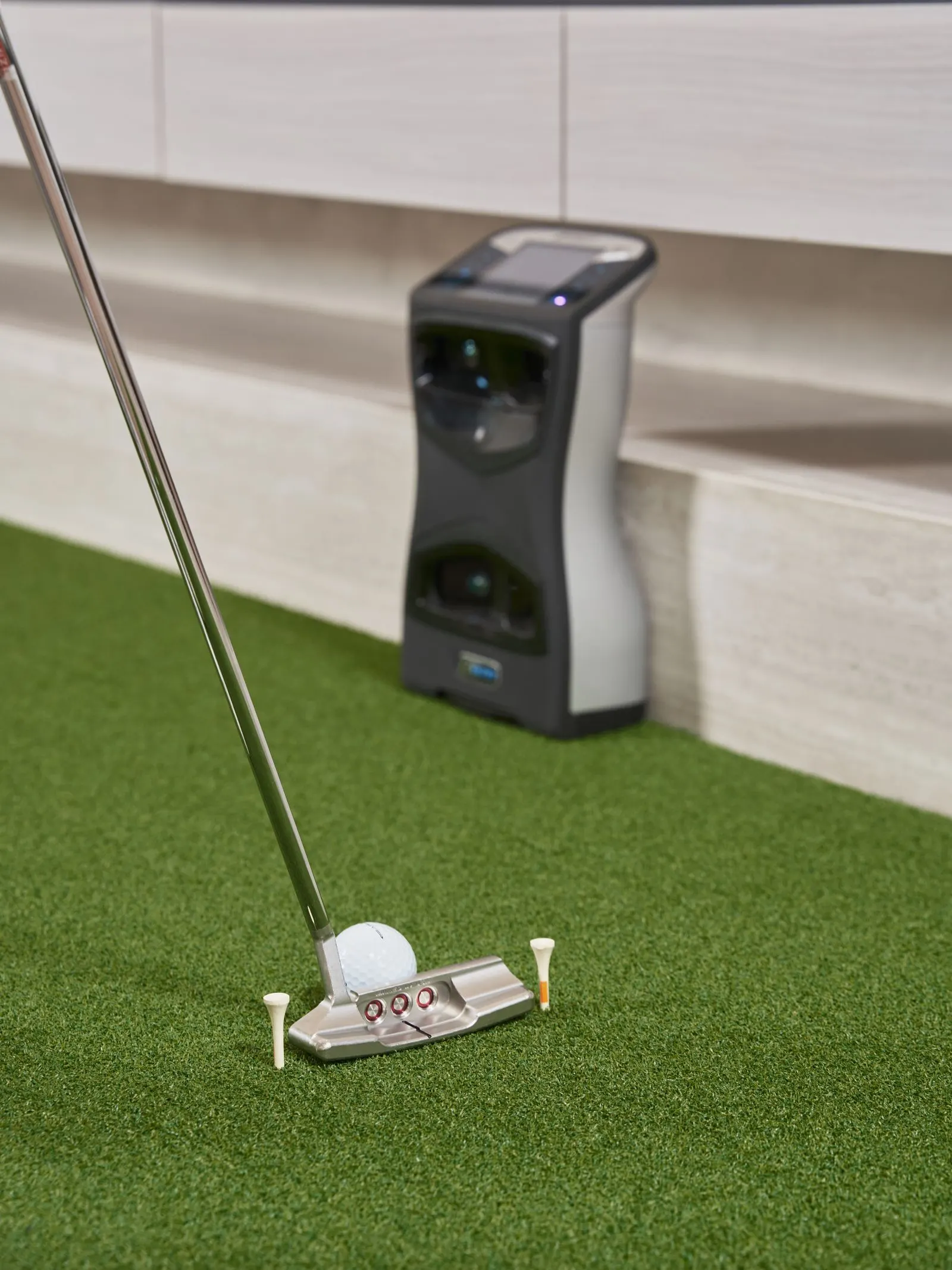
- Sits beside the ball, so it fits rooms where a radar has no chance
- Reads chips and half wedges indoors that radar units miss
- Connects to GSPro, E6 Connect, FSX Play, Awesome Golf and TGC 2019
- Works the same indoors and outdoors, in any light
What we don’t
- The free tier shows basic ball data only. You need Silver (around $200 a year) or Gold (around $500 a year) for full data and outside programs
- Club data needs the ball-and-club edition, which pushes the price toward $4,000, plus a fresh face sticker every session
- Prices and tier contents changed several times in 2025 and 2026, so last year's forum advice may be out of date
- The ball has to sit in a small zone beside the unit, and a lefty has to move the unit to the other side
On this page
What the Launch Pro is and who it’s for
The Bushnell Launch Pro is a Foresight GC3 with a Bushnell badge on it. It’s a camera unit (also called photometric).
Three high-speed cameras sit in a box about the size of a small toaster, on the floor beside the ball. They snap the ball in its first few inches of flight and work out everything from those photos.
It has its own touchscreen, so you don’t need a phone. It runs on a battery or plugs into the wall. The price runs from $2,500 to $4,000 depending on the edition, and that spread is the first thing to get your head around.
Below this price, units measure some numbers and guess others. The Launch Pro measures the ones that matter. What you’re really deciding is how much of that data you’ll pay to see each year.
Who’s it for? Golfers who practice seriously. If you want carry and spin numbers you can trust, and your room has no space behind the ball, this is your unit.
Skip it if you want one price and no fees. Skip it too if you only want to play rounds, because a cheaper unit does that for less.
Tracking
High-speed cameras
Sits
Beside the ball
Room depth
12–13 ft
Ball flight needed
8 ft
Club data
With subscription
Price
$2,500–$4,000
Room depth is where the maker says the unit sits, plus 8 ft of ball flight. The lower figure is with a net. The higher one adds the 1 ft gap behind an impact screen. Check your own room.
What it measures, and how the cameras do it
There are two ways to read a golf shot. A radar sits behind you and watches the ball fly, like the speed gun at a baseball game. Then it works backward to figure out what happened at impact.
A camera unit does the opposite. It takes super-fast photos of the ball right as you hit it, then works out where the ball would have gone.
The Launch Pro fires three cameras at once. It reads ball speed, launch angle, launch direction, spin rate and spin axis straight from the photos. Nothing on the ball side is a guess.
Spin rate is how fast the ball spins. Spin axis is the tilt that makes it curve.
Club data takes more explaining. The cameras can watch the clubhead too. They report club speed, attack angle, club path, face angle, face to path, loft and lie at impact.
Face to path is the gap between where the face points and where the club is moving. It’s what decides how much the ball curves.
But two things have to be true. You need the ball-and-club hardware (sold as the Circle B editions), which is the top of the price range. And the club data sits behind the paid tiers.
There’s one more catch. The cameras find the clubface using small shiny stickers you put on the face.
That means a fresh sticker each session and a quick check that it hasn’t peeled off. It’s a small chore, but it’s every session.
If you only need ball data, the ball-only edition at the low end gives you the full ball set and no stickers at all. Start there unless you know you need club data.
The room it needs
The Launch Pro sits a short way to the side of the ball, level with it, aimed across the hitting zone. Behind you, it only needs swing room. That’s why it works in a spare room or a short garage, where a radar would need 7 ft that isn’t there.
What it does need is ball flight. Bushnell asks for at least 8 ft from the ball to the screen or net, and a bit more is kinder to the screen.
How deep a room the Bushnell Launch Pro needs
13 ft wall to wall with an impact screen, 12 ft with a net.
4 ftswing room
8 ftball flight
1 ftgap
With a net instead of a screen, you skip the 1 ft gap and 12 ft works. Width and ceiling come down to your swing.
Put your three measurements into the room checker to confirm the fit. The dimensions page explains where each number comes from.
Owners share two placement habits. First, the ball has to sit in a fairly small zone in front of the cameras. The unit’s screen shows whether it can see the ball before you swing.
Second, a lefty has to move the unit to the other side of the mat. It takes a minute, but it matters if two people share the bay.
Software, and what each tier turns on
The tiers have changed several times since 2025. Older forum posts may describe a different setup from this one.
| Tier | What it gives you | Cost |
|---|---|---|
| Free | Basic ball data on the unit and in the Bushnell app | $0 |
| Silver | Fuller data, software links, outside simulator programs | Around $200 a year |
| Gold | Everything, including full club data on ball-and-club editions | Around $500 a year |
So the Launch Pro is really three different buys:
- A ball-only unit on the free tier is a very accurate practice range.
- A ball-only unit on Silver is a simulator that runs GSPro, E6 Connect, Awesome Golf or TGC 2019.
- A ball-and-club unit on Gold is a full fitting tool.
For simulator software (the “video game” part), it connects to Foresight’s own FSX Play and FSX 2020 programs. It also runs TGC 2019, GSPro, E6 Connect and Awesome Golf. GSPro runs on a Windows PC, and our GSPro guide covers the setup.
FSX Play has its own course pricing. The software hub compares them all.
Hate the idea of paying every year for data the box already collects? Then look at the GC3 from Foresight.
It’s the same unit, but you pay $6,500 to $7,500 up front and the data and FSX are yours for good. Over years of ownership, the two routes end up closer in cost than the sticker prices suggest.
What owners report about accuracy
Owners and independent reviewers mostly agree. Ball speed, launch angle and spin match tour-level units shot for shot, indoors and out. Carry distances are the ones people build yardage charts from.
The short game is where it shines. Chips, pitches and half wedges that radar units miss or misread come through clean. The cameras see impact, so they don’t need a long flight to track.
The complaints are about the plan, not the numbers. Some owners bought under an earlier tier setup, then saw features move to a higher tier, and they’re loud about it.
Ball placement is also stricter than with a radar. A ball nudged outside the zone gets no read at all, rather than a bad one.
On the club side, owners on Gold call the numbers reliable. The usual catch applies: the sticker has to be clean and in the right spot.
Setting it up as a simulator
The practice build is the Launch Pro on the floor beside a mat, hitting into a net. You read the numbers off its own screen. No phone, no PC.
The full build adds an impact screen (the tough fabric screen you hit into), a projector and a Windows PC running GSPro or FSX Play. The unit links to the PC by USB or Wi-Fi.
It sees impact, so it doesn’t need the screen far away to track. The screen still needs to be 8 ft or more out, so the ball has slowed down before it hits.
Our impact screen guide and the enclosures hub cover the screen and frame. The cost builder adds up the Launch Pro, the tier and the rest of the bay. And our best home simulators page shows this unit inside complete bays at this budget.
One lighting note from owners. The cameras bring their own light, so the unit isn’t fussy about your room lighting. It works outside in the sun, too.
Who should buy something else
Want ball and club data for less, and can you live with a slightly slower read? Buy the SkyTrak+. It also sits beside the ball, reads the club with a radar, and runs on a Mac or iPad.
In 2026, closeout deals under $2,000 showed up. Owners rate its accuracy a step below the Launch Pro, and its plan is around $250 a year.
If you just want to play rounds in a short room and spin matters less, buy the Square Golf. It costs $600 to $700, sits beside the ball and runs GSPro.
If your room is deep enough and you want no subscriptions at all, the Full Swing KIT is a radar with no required fee. Our Full Swing review covers it. The best launch monitors list ranks them all side by side.
First, decide which Launch Pro you’re buying: the free-tier practice range, the Silver simulator or the Gold fitting tool. Then price it over five years, and compare that with the GC3 and the SkyTrak+.
Still the Launch Pro? Check your ball flight in the room checker, and order the ball-only edition unless you know you need club data. Then budget for the tier from day one.
Questions people ask
Is the Bushnell Launch Pro the same as the Foresight GC3?
Yes, the hardware is the same three-camera unit. Bushnell sells it with yearly tiers, while the GC3 is paid for up front. The data and accuracy match, so you're really picking how to pay: a lower price plus a yearly fee, or a higher price with everything included for good.
Do you need a subscription for the Bushnell Launch Pro?
Not for basic ball data. For full data, software links and outside programs like GSPro, yes. Silver is around $200 a year and Gold around $500 a year, and using it as a simulator with outside software means paying for one of them.
How much room does the Bushnell Launch Pro need?
It sits beside the ball, so you only need about 4 ft of swing room behind you. Bushnell and Foresight ask for at least 8 ft of ball flight to the screen or net. That's 12 ft of depth with a net, 13 with a screen. Width and ceiling depend on your swing, so check your numbers in our room checker.
Keep reading
- The best golf launch monitors for a home simulatorNine launch monitors ranked for a home simulator, from a $200 range radar to a $7,000 camera, with the room each needs and what it costs over three years.Best-of listRead it
- SkyTrak+ reviewWhat the SkyTrak+ measures, what its yearly plan costs, the room it needs, and who should buy it now that the ST MAX has pushed it onto closeout.ReviewRead it
- GSPro: what it is, what it costs and what runs itWhat GSPro is, what the yearly subscription roughly costs, the Windows PC it needs, which launch monitors connect to it, and how to set it up with a projector.GuideRead it
- The best golf impact screens and enclosuresScreen only, frame or full enclosure: how to pick a golf impact screen, how much gap it needs behind it, sizes, noise and what each type costs.Best-of listRead it
- The best launch monitors under $1,000Five launch monitors under $1,000 ranked for home use, with the room each needs, the three-year cost with fees, and what you give up at this price.Best-of listRead it
- Garmin Approach R10 reviewWhat the Garmin R10 measures, where it falls short, how much room it needs, and who should buy it over the MLM2PRO or Square Golf.ReviewRead it