Garmin R10 simulator setup: everything you need beyond the R10
How to build a Garmin R10 simulator step by step: the room it needs, the mat, net or screen, phone or PC, software, projector or TV, and what three builds cost.
How we make money. If you buy through a retailer link here, we may earn a commission. It costs you nothing and doesn’t change our picks. Our affiliate disclosure.
Key takeaways
- The cheapest R10 simulator is the R10 ($500–$600), a mat, a net and your phone running Garmin Golf. That's about $800 to $1,100 all in.
- Plan on 15 ft of depth with a net or 16 with a screen (7 ft from unit to ball, 8 ft of flight), about 10 ft of width and a 9 to 10 ft ceiling.
- Ball data and the practice range are free. Courses need the Garmin Golf membership (about $10 a month). GSPro has its own yearly fee and needs a Windows gaming PC.
- Add an impact screen, projector and PC, and the build reaches about $2,850 at the low end of each band. At that point, price a stronger launch monitor too.
On this page
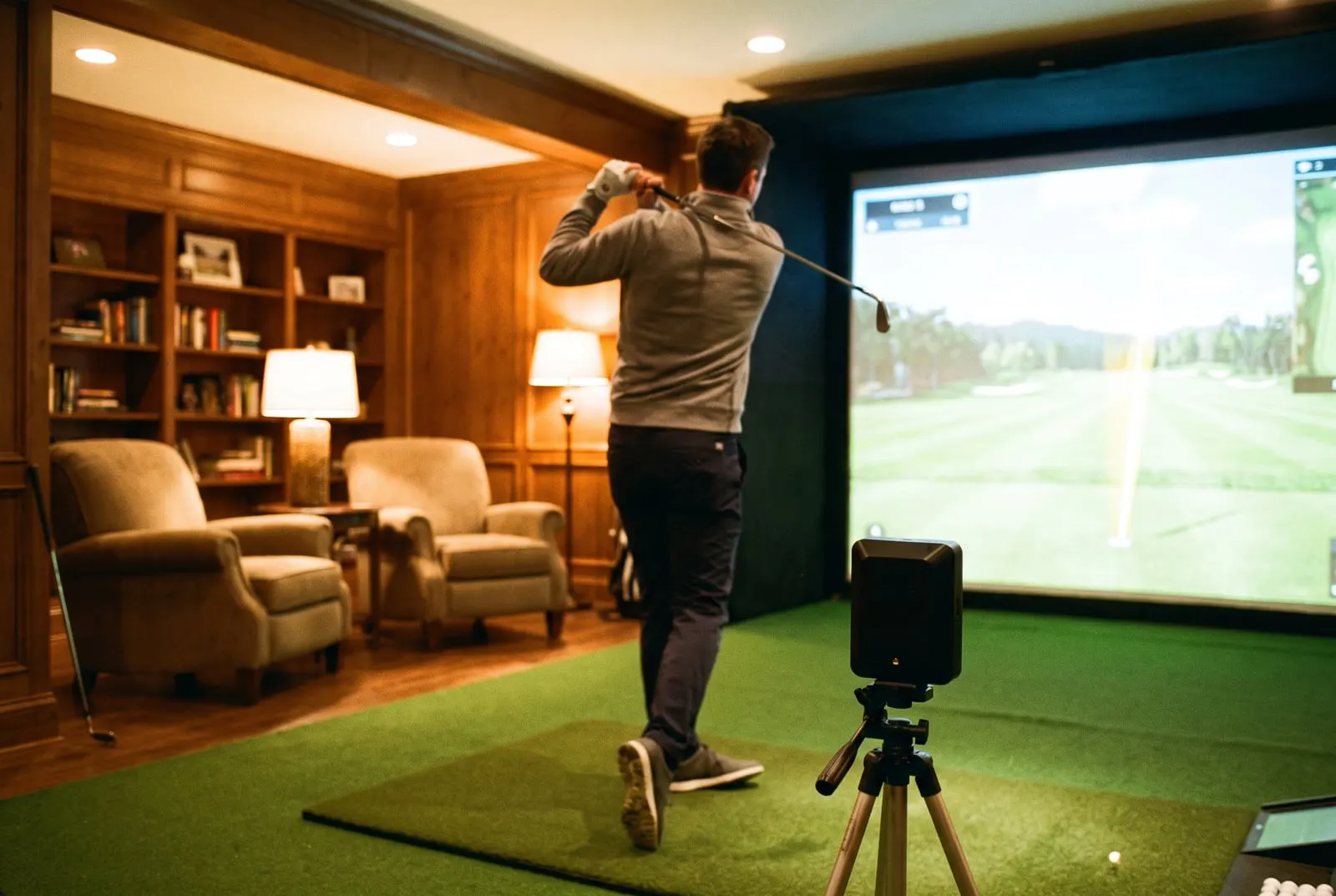
The Garmin Approach R10 is the cheapest launch monitor that plays real simulator golf. A launch monitor is the gadget that measures your shot and tells the software where the ball would have gone.
Open the R10’s box, though, and it’s nearly empty. Inside you’ll find the radar, a small tripod, a phone mount and a case.
Everything that turns it into a simulator is a separate choice: the mat, the net, the software and the rest. Those choices decide your total far more than the R10 does. Below, we go through them in the order you should make them. Want to know what the unit measures and where it falls short? That’s in our R10 review.
Tracking
Doppler radar
Sits
7 ft behind the ball
Room depth
15–16 ft
Ball flight needed
8 ft
Club data
Partial or estimated
Price
$500–$600
Room depth is where the maker says the unit sits, plus 8 ft of ball flight. The lower figure is with a net. The higher one adds the 1 ft gap behind an impact screen. Check your own room.
Check the room before anything else
The R10 is a radar unit. It sits behind you, not beside the ball, and tracks the ball in flight like the speed gun at a baseball game. That changes the room math. Garmin asks for about 7 ft between the unit and the ball, and about 8 ft of ball flight in front of it.
How deep a room the Garmin Approach R10 needs
16 ft wall to wall with an impact screen, 15 ft with a net.
7 ftradar behind you
8 ftball flight
1 ftgap
Width is the same as for any simulator: about 10 ft, so a right-hander and a left-hander can both swing. For a driver with a full follow-through, the ceiling needs to be 9 to 10 ft.
Say your room is 14 ft deep. The R10 only fits if you pull it closer than Garmin asks, or cut the ball flight under 8 ft. Either way, you’re running it outside Garmin’s guidance.
In that room, a camera unit that sits beside the ball, like the Square Golf, is the better buy. Our budget simulators list explains why. Run your numbers through the room checker first. It takes a minute.
The mat
The mat is the easiest part to get wrong, because cheap mats hurt. A thin mat on concrete sends every fat shot straight up your arms.
Look for a strike strip that gives a little, a stance area big enough for both feet, and a surface that holds a real tee. A 4 ft by 5 ft stance-and-strike mat is the practical minimum. A mat with a replaceable strike strip costs more and lasts years.
Approximate band: $150–$900. A low-end mat is fine for the first month. Our hitting mat guide ranks the options. The mat is also the one part of this build that carries over unchanged if you upgrade the launch monitor later.
Net or screen
A net is the budget answer, and it works. A 7 ft pop-up net catches full shots from 8 ft away. A frame net with side baffles (side panels) catches the shanks too. Approximate band: $150–$400.
If the wall behind the net is drywall, hang a thin sheet of foam or an old mat behind it. Nets sag, and a well-struck ball still has pace when it reaches the back.
An impact screen with a frame turns the build into a bay. That’s the tough fabric screen you hit into, with the course projected onto it. You hit at a picture of the fairway instead of a net with a phone beside it. Approximate band: $600–$3,000 for a screen with frame or a basic enclosure.
The screen needs a projector, and the projector needs a room that’s dark enough and wide enough. So this is where a $900 build becomes a $3,000 one. The impact screen guide covers screen fabrics and frames.
Phone, tablet or PC
The R10 pairs over Bluetooth with the Garmin Golf app on a phone or tablet. That’s the simplest build: prop the phone on the mount, hit, look. The screen is small, but the app is quick. A tablet makes the numbers easier to read from the mat, and it costs nothing if you already own one.
You only need a PC if you want GSPro. It runs on Windows and needs a proper graphics card. Approximate band: $900–$2,000 for a gaming PC.
E6 Connect and Awesome Golf run on lighter hardware and on iOS, so a PC is optional. Already own a Windows gaming machine? Then this line costs you nothing.
Software
The R10 runs all four of these programs.
Garmin Golf is the app in the box. Ball data and the practice range are free. The Garmin Golf membership (about $10 a month) adds virtual courses. That can be your whole simulator: full rounds on a phone, with no PC and no extra license. It’s the cheapest route, and the one to start with.
E6 Connect is the middle option. It runs on iOS and Windows, with a solid course list and a subscription. Most retailers bundle it with mid-range units. It looks better than the Garmin app on a big screen, and the iOS version doesn’t need a gaming PC.
GSPro is the enthusiast pick. It runs through GSPro Connect on a Windows PC, has the biggest course library in home simulation, and charges a yearly fee. The R10’s club data is partial, so some of GSPro’s shot shaping leans on estimates. Our GSPro guide lists the PC it needs.
Awesome Golf is lighter than GSPro, with games and practice modes aimed at families. It runs on iOS and Windows.
Across all four, software runs an approximate $0–$700 a year. The software hub compares them in detail.
Projector or TV
A TV is the cheap big screen. Mount one beside or above the net, then mirror your phone or run the app on a PC. Now you can read the shot without a projector. A TV you already own costs nothing, and a new one costs whatever you decide to spend.
A projector is the only way to put the course on the screen you’re hitting into. It needs to be short-throw, meaning it makes a big picture from only a few feet away. That lets it sit between you and the screen without throwing your shadow on the picture. It also needs to be bright enough for a room that isn’t fully dark. Approximate band: $700–$2,000.
Don’t buy a projector before you’ve picked the screen size, because the two have to match. The projector guide explains throw ratio and mounting.
Tees, balls and the small parts
Use real golf balls, not foam. The R10 reads the ball’s flight, and foam balls fly nothing like the real thing.
Use tees that fit your mat. Rubber tees push into most strike strips, and a few mats take a normal wooden tee. Add a phone or tablet stand if the mount in the box doesn’t suit your setup.
A small rug or an alignment stick can mark where the R10 sits, so it goes back in the same spot every time. The tripod comes in the box, and the unit works on the floor too.
Three builds and what they cost
Every line other than the R10 is an approximate band. The totals use the low end of each band, because that’s what a careful first build spends.
| Part | Net and phone | TV and mat | Projector and screen |
|---|---|---|---|
| Garmin R10 | $500–$600 | $500–$600 | $500–$600 |
| Hitting mat | $150–$900 | $150–$900 | $150–$900 |
| Net or screen | Net $150–$400 | Net $150–$400 | Screen and frame $600–$3,000 |
| Display and computer | Phone, $0 | Existing TV, $0 | Projector $700–$2,000, PC $900–$2,000 |
| Software | $0–$700 a year | $0–$700 a year | $0–$700 a year |
| Total at the low end | About $800 | About $800, plus the TV | About $2,850 |
The TV build costs the same if you already own the TV. You get a screen you can actually read for the price of a wall mount.
The projector build is a real bay. It’s also where the R10 starts to look like the weakest part of the setup. If you’re spending $3,000, read our best home simulators list before you commit. Put your own numbers in the cost builder and see where you land.
Setting it up on the day
- Lay the mat. Put it down first, then mark where the ball sits.
- Place the R10. Measure 7 ft back along the target line. Set the R10 there on its tripod, level, with its face pointed at the ball.
- Check the flight. Measure 8 ft forward from the ball to the net or screen.
- Pair it. Connect the unit to the Garmin Golf app and pick your club.
- Hit ten shots. Use a mid-iron, and don’t change anything until all ten are done.
Numbers look wild? The likely causes are the unit sitting off the target line, the ball not on its marked spot, or a flight shorter than 8 ft. If the flight is short, try moving the net back 1 ft first. Do that before you touch any setting in the app.
Then pick which of the three builds you want to live with. Starting with the net and phone, then adding the screen a season later, works fine. Nothing you buy for the first build goes to waste in the second.
Still choosing between the R10 and its closest rival? The R10 and MLM2PRO comparison ends with a straight answer. The golf simulator hub has the other builds.
Questions people ask
What do you need for a Garmin R10 simulator?
The R10, a hitting mat, a net or an impact screen, and a phone or tablet running the Garmin Golf app. That's the whole minimum build, and it lands around $800 to $1,100 with a basic mat and net. A projector, a screen and a PC for GSPro or E6 Connect are optional upgrades.
How much space does a Garmin R10 simulator need?
Garmin asks for about 7 ft between the unit and the ball, and about 8 ft of ball flight in front of it. That's a room 15 ft deep with a net, or 16 ft with an impact screen and the foot it needs behind it. You also want about 10 ft of width and a 9 to 10 ft ceiling for a driver. Rooms under 15 ft deep are a bad fit.
Does the Garmin R10 work with GSPro?
Yes, through GSPro Connect on a Windows gaming PC. GSPro has its own yearly fee. The R10's club data is partial, so some GSPro features run on estimates. E6 Connect and Awesome Golf also run the R10 and need less computer.
Keep reading
- Garmin Approach R10 reviewWhat the Garmin R10 measures, where it falls short, how much room it needs, and who should buy it over the MLM2PRO or Square Golf.ReviewRead it
- The best budget golf simulators (under $1,000 to $3,000)What a cheap golf simulator really gets you at $800, $1,500 and $3,000, the five units worth buying, and what marketplace bargains usually turn out to be.Best-of listRead it
- Garmin R10 vs Rapsodo MLM2PROR10 or MLM2PRO: what each costs over three years with subscriptions, measured vs estimated spin, the room both need, and which one to buy.Head to headRead it
- GSPro: what it is, what it costs and what runs itWhat GSPro is, what the yearly subscription roughly costs, the Windows PC it needs, which launch monitors connect to it, and how to set it up with a projector.GuideRead it
- The best golf simulators for home in 2026The best home golf simulators sorted by budget tier, with a parts list and price bands for each, from a $700 garage starter to a TrackMan bay.Best-of listRead it
- Full Swing golf simulator review: the KIT and the full packagesWhat the Full Swing KIT measures, what the software and built-to-order bays add, the 16 to 17 ft room it needs, and the cheaper units to weigh against it.ReviewRead it